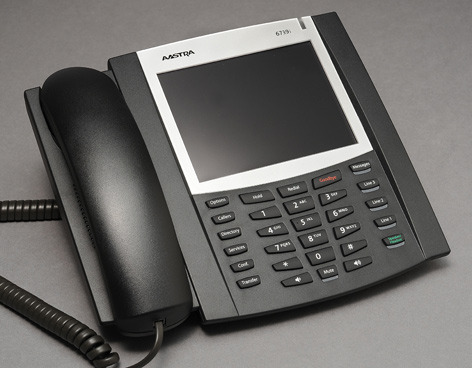
Set up voice mail
-
Press "messages" (right button, just below the screen)
-
When prompted, enter the default passcode provided by your ISU voice/data coordinator, followed by "#."
-
When prompted, change your passcode, followed by "#." Your passcode must be 6-12 characters long. You can't:
-
repeat a single number (333333)
-
use your own phone number or your phone number reversed
-
use your previous passcode or your previous passcode reversed
-
When prompted, record your name
Note: After five failed attempts, a passcode is revoked. You'll need to contact the Solution Center, 4-4000, to reset.
Until conversion
Your new phone won't be fully functional until it's completely converted to the new system. Until conversion, your phone:
-
Won't display caller IDs
-
Won't relay calls from old model university phones or off-campus.
Check voice mail
-
Pick up handset
-
Press "messages" key
-
Enter your passcode
-
To access your voice mailbox, press 1
To access voice mail from an off-campus phone:
-
Dial (515) 296-6245. You'll need your mailbox ID, which is your 5-digit extension (for example, 4-XXXX), and your passcode.
Transfer a call
To make the transfer unannounced
-
Press "transfer" on the touchscreen or the “transfer” key
-
Dial desired number (4-XXXX)
-
Press “transfer” again or the “goodbye” key to complete the transfer
To make the transfer after announcing the call:
-
Press "transfer" on the touchscreen or the "transfer" key
-
Dial desired number, wait for answer and announce the transfer
-
Press "transfer" on touchscreen or “goodbye" key to complete the transfer
To cancel the transfer and return to original caller:
-
If phone is still ringing, press the active (lit) line key (usually, line 1)
-
To return to the original caller after speaking with the second party, press the active (lit) line key (usually, line 1)
To transfer caller to Jane Doe's voicemail:
-
Press"transfer" on the touchscreen or the "transfer" key
-
Dial voicemail number -- 6-0927
-
At the prompt, dial Jane Doe's number -- 4-XXXX
-
Press "transfer" on touchscreen or “goodbye" key to complete the transfer
Adjust volume
Use the two sound keys (bottom row) to adjust volumes.
-
To set ringer volume, leave the handset in the cradle.
-
To set handset volume, lift handset and adjust
-
To set speaker volume, adjust while speaker is turned on
-
To set headset volume, adjust volume while on a call
User guide
Detailed instructions on using your phone is in the online Aastra 6739i user guide (PDF)